Images and diagrams are essential for careers in the fields of science, technology, engineering and mathematics. However, these crucial sources of information are not accessible to people with visual disabilities. The alt text attribute is frequently used to provide a summary of an image, but it is not sufficient for describing complex images, like a diagram of a hydraulic valve, or parts of the body like kidneys etc.
At this point of time, the most appropriate and cost effective solution for making complex images accessible is the use of extended descriptions. It enables authors and publishers to provide longer descriptions in well-structured text. The good news is that the HTML and ARIA specifications already have some features for supporting extended descriptions, but there are implementation challenges in the current state of web browsers, EPUB 3 reading systems and assistive technologies. Therefore we initiated an activity in our working group for evaluating the implementation shortcomings of different reading environments, and developing the best practices for authoring extended descriptions, which enables the users to understand the images in a wider range of EPUB reading environments.
It is possible that the recommendations for EPUB 3 environments provided in this report are a little different from the recommendations for the web environment. Though most of EPUB 3 reading systems use components from web browsers, the reading systems tend to change and sometimes override the web browser functionality, which results in a somewhat different reading experience.
Recommendations
After thorough evaluation, we are able to propose two techniques at this point of time. These techniques worked in a majority of the reading environments. This does not guarantee full support, but these provide a way forward while the web browsers, EPUB reading systems and assistive technologies catch-up.
Technique 1: Extended description in a separate HTML file with hyperlink
This technique provides extended descriptions in a separate HTML file (e.g. and appendix at the end of the e-book) from the main content, with a hyperlink blow the image to the description and a back link to return to the original reading position.
This technique is recommended over the use of HTML details element (see Technique 2) as it provides better support across reading systems and reduces cognitive load for users.
Advantages:
Simple technique, authors and publishers are already familiar with it.
Complexities and technical limitations in some EPUB reading systems due to collapsing and expanding are avoided, and fidelity of the page is maintained to a great extent.
Almost all EPUB reading systems support hyperlinks.
Including a copy of the original image marked as presentational (role="presentation") can help cognitive users with understanding the extended description in context with the image.
Multiple extended descriptions can be placed in the same HTML file, organized with section elements.
The extended description file can be excluded from the reading order by setting linear="no" in the EPUB spine.
Disadvantages:
Results in branching from the reading flow and sometimes the reading position may be lost when returning.
Accuracy of linking back to original reading position matters, and some reading systems may fail to provide this accuracy.
Setting up the main content
By "main content" we refer to the primary content of your EPUB publication (chapters, sections, etc.) where the images that need extended descriptions appear.
Key requirements:
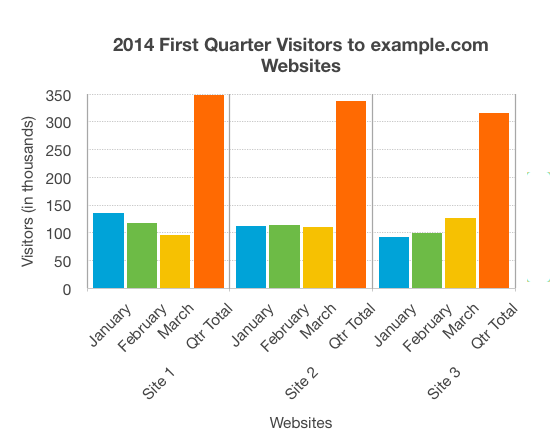
The image must have a brief alt text that describes what the image is (e.g., "Bar chart showing quarterly website visitors").
After the image (or group of images), there must be a link pointing to its (their) extended description.
The content of the link to the extended description can be textual (for example, "Extended description", or more specific, localized in the language of the text), or it can be an icon whose accessible name (alt or aria-label) must include the term Extended description (in the language of the text).
The link must have a unique id attribute.
The image must have an aria-details attribute pointing to that link's ID.
This creates a programmatic relationship that assistive technologies can use to announce the availability of an extended description
The general pattern is:
Examples
In this section, we provide some examples, which are not exhaustive, of how the code relating to the link to the extended description can be structured in different cases.
Setting up the external file with extended descriptions
Extended descriptions should be placed in a separate HTML file that is referenced from the extended description link and with a backlink to the main content. This file can be inserted at the end of the e-book and/or marked as non-linear, meaning that it does not appear when browsing through the e-book. A single HTML file can contain multiple extended descriptions.
Each extended description must:
Be wrapped in a section element with an ID that matches the fragment identifier in the link
Include a heading that describes the content
Include a copy of the image marked as presentational (role="presentation" and alt="") to prevent screen readers from announcing it twice, but for for visual reference
Contain the detailed description
Include a back link with role="doc-backlink" to return to the original image
To avoid external files with many extended descriptions becoming too large and creating long load times, multiple files can be used. These files must be identified in the spine as described below.
EPUB spine configuration
The extended description file can be marked as linear="no" in the EPUB spine (inside the OPF file) to exclude it from the normal reading order.
Example
Technique 2: Extended description placed in HTML details element, just below the image
Advantages:
The extended description is provided just below the image, the next item in the reading order. This means that the user does not need to change from the reading flow, and lose their reading position.
The details element does not show the description by default, the user needs to expand it to show the description, therefore it does not clutter the page for users who do not need extended descriptions.
It is a good approach for publishers who do not want additional portions of description text visible on the page.
Disadvantages:
If a publication has a large number of images and extended descriptions, the task of locating the details, and expanding it to read descriptions puts considerable cognitive load, especially on the people with cognitive disabilities.
There are EPUB reading systems which do not support HTML details properly, and details element is always expanded. Such a situation clutters the page with a huge amount of text and makes it very difficult for everyone to read the publication.
Sometimes publishers need to create pixel perfect pages, and visibility of detail's elements get in the way of achieving it.
If the extended description inside the details element is huge, expanding it may disorient the user, especially when the reading system has paginated view.
Code Example 1
            <img src="chart-ebcaadfb.png"
            alt="Bar chart showing monthly and total visitors for the first quarter 2014 for sites 1 to 3."
            aria-details="image1-extended-desc" />

          <details id="image1-extended-desc">
              <summary>Expand / collapse Extended Description</summary>
              <div>
                  <h5>Overview</h5>
                  <p>The chart shows the website hits for the first quarter of 2014. It shows that Site 1 has more visitors
                      than either of the other sites, but the number of visitors is decreasing. Site 2 has a fairly constant
                      number of visitors, while for Site 3 page hits are increasing month on month.</p>
                  <h6>Data</h6>
                <table>
                    <tr>
                        <th scope="col">Period</th>
                        <th scope="col">Site 1</th>
                        <th scope="col">Site 2</th>
                        <th scope="col">Site 3</th>
                    </tr>
                    <tr>
                        <th scope="row">Jan</th>
                        <td>135</td>
                        <td>112</td>
                        <td>92</td>
                    </tr>
                    <tr>
                        <th scope="row">Feb</th>
                        <td>117</td>
                        <td>114</td>
                        <td>99</td>
                    </tr>
                    <tr>
                        <th scope="row">Mar</th>
                        <td>96</td>
                        <td>111</td>
                        <td>126</td>
                    </tr>
                    <tr>
                        <th scope="row">Qtr Total</th>
                        <td>348</td>
                        <td>337</td>
                        <td>308</td>
                    </tr>
                </table>
            <h6>Presentation</h6>
                  <p>The bar chart represents both the number of visitors per month for each website, and the total number
                      of visitors per website for the entire quarter. Website visitors for each month are represented using
                      columns lined up horizontally, with heights indicating the number of visitors. A fourth column is
                      provided for each website with the accumulated site visitors for the quarter.</p>
              </div>
          </details>
Code Example 1 Preview
Expand / collapse Extended Description
Overview
The chart shows the website hits for the first quarter of 2014. It shows that Site 1 has more visitors
than either of the other sites, but the number of visitors is decreasing. Site 2 has a fairly constant
number of visitors, while for Site 3 page hits are increasing month on month.
Data
Period
Site 1
Site 2
Site 3
Jan
135
112
92
Feb
117
114
99
Mar
96
111
126
Qtr Total
348
337
308
Presentation
The bar chart represents both the number of visitors per month for each website, and the total number
of visitors per website for the entire quarter. Website visitors for each month are represented using
columns lined up horizontally, with heights indicating the number of visitors. A fourth column is
provided for each website with the accumulated site visitors for the quarter.